
Settings
The Settings page is where you personalize FITools to match your investment style. You set a monthly income target, define quality standards for the companies you consider, and configure your preferred options strategy parameters. These preferences carry over into the screener so every search starts from your baseline.
Overview
Section titled “Overview”Navigate to Settings from the user menu. The page is organized into three areas:
- Income — your monthly premium income goal
- Company Filters — fundamental, profitability, valuation, health, and growth criteria for the screener
- Options Strategy — strategy type, timing, yield, liquidity, Greeks, and risk management defaults
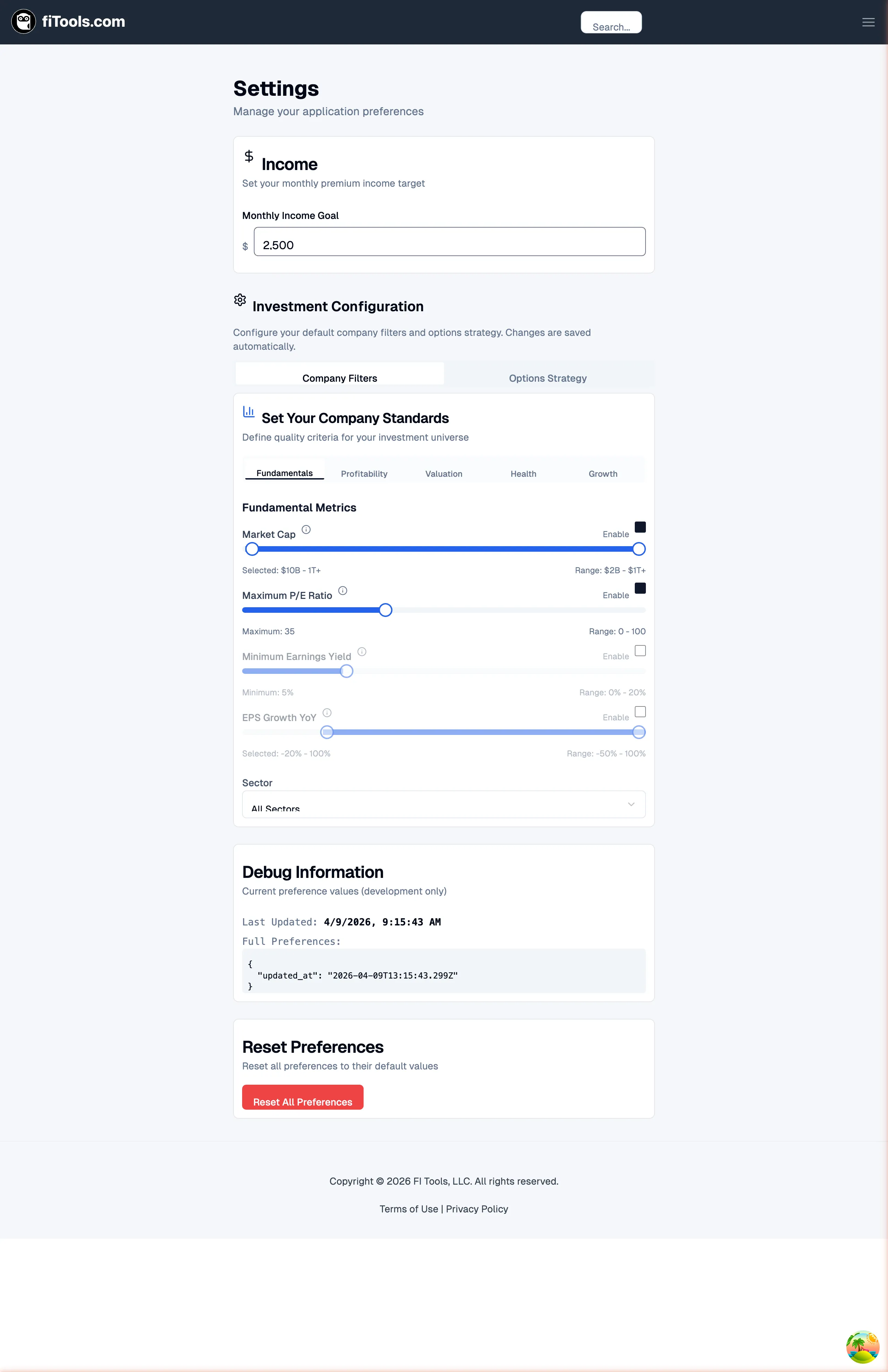
Changes to company filters and options strategy save automatically. Income goal changes require you to press Save or hit Enter.
Set your income goal
Section titled “Set your income goal”The Income card at the top of the page accepts a monthly premium income target in dollars. This goal feeds into the dashboard progress tracker so you can measure actual collected premium against your target each month.
To set or update your goal:
- Enter a dollar amount in the Monthly Income Goal field (minimum $1).
- Press Enter or click Save.
To remove the goal, click Clear goal. A green confirmation banner appears briefly after each successful save.
Configure company filters
Section titled “Configure company filters”The Company Filters tab lets you define quality thresholds that the screener uses to narrow your investment universe. Each filter has an Enable checkbox — only enabled filters are applied during screening.
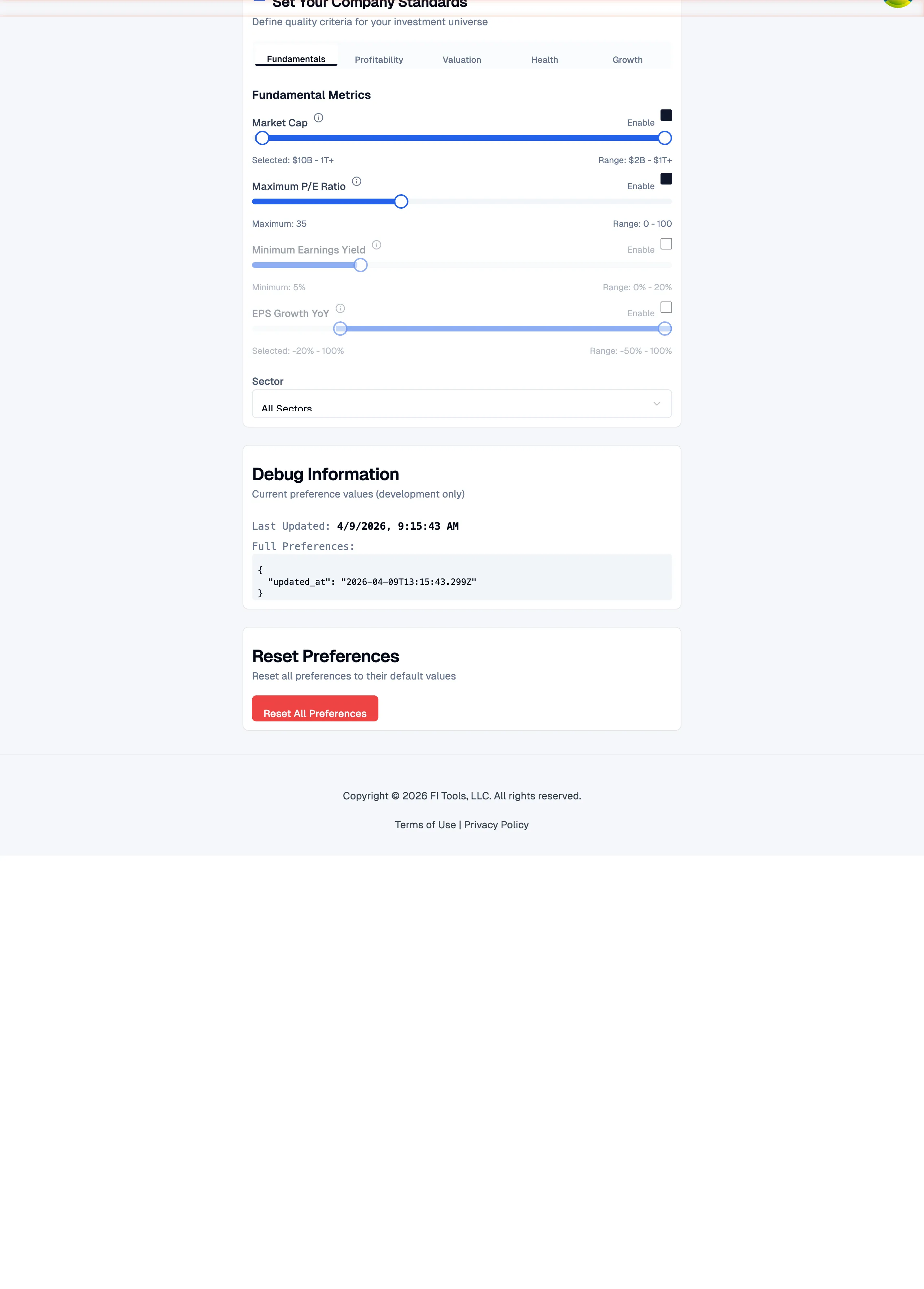
Filters are organized across five sub-tabs:
Fundamentals
Section titled “Fundamentals”- Market Cap — set a minimum and maximum range (default $2B to $1T+)
- Maximum P/E Ratio — cap the price-to-earnings multiple (range 0-100)
- Minimum Earnings Yield — floor for earnings yield percentage (range 0-20%)
- EPS Growth YoY — year-over-year earnings-per-share growth range (-50% to 100%)
Profitability
Section titled “Profitability”- ROE (Return on Equity) — minimum threshold (range 0-50%)
- ROIC (Return on Invested Capital) — minimum threshold (range 0-40%)
- Gross Margin — minimum percentage (range 0-100%)
- Operating Margin — minimum percentage (range 0-50%)
- EBITDA Margin — minimum percentage (range 0-50%)
Valuation
Section titled “Valuation”- Price to Sales (P/S) — maximum multiple (range 0-20x)
- Price to Tangible Book — maximum multiple (range 0-20x)
EV/EBITDA and EV/Revenue settings are temporarily unavailable while their enterprise-value inputs are being verified. Existing saved thresholds remain stored but inactive.
Health
Section titled “Health”- Current Ratio — minimum liquidity ratio (range 0-5)
- Quick Ratio — minimum acid-test ratio (range 0-5)
- Debt-to-Equity — maximum leverage ratio (range 0-5x)
- Debt-to-EBITDA — maximum leverage multiple (range 0-10x)
- Altman Z-Score — minimum bankruptcy-risk score (range 0-5)
Growth
Section titled “Growth”- Dividend Yield — acceptable yield range (0-10%)
- Dividend Payout Ratio — acceptable payout range (0-100%)
- Revenue Growth YoY — year-over-year revenue growth range (-50% to 100%)
A Sector dropdown at the bottom of the filters lets you restrict results to a single GICS sector or leave it on “All Sectors.”
Configure options strategy
Section titled “Configure options strategy”Switch to the Options Strategy tab to set your default screening parameters for option contracts.
Strategy focus
Section titled “Strategy focus”Choose which strategies the screener surfaces:
- Covered Calls only
- Cash-Secured Puts only
- Both strategies
Timing and distance
Section titled “Timing and distance”- Days to Expiration (DTE) — set a min/max range (0-180 days)
- Strike Distance from Current — how far OTM/ITM in percentage terms (0-50%)
Income
Section titled “Income”- Minimum Annualized Yield — floor for the annualized premium return (0-100%)
Liquidity
Section titled “Liquidity”- Minimum Open Interest — contracts outstanding (0-10,000)
- Minimum Daily Volume — trading volume floor (0-5,000)
- Maximum Bid-Ask Spread — percentage spread cap (0-30%)
Greeks
Section titled “Greeks”- Implied Volatility (IV) — acceptable IV range (0-200%)
- Delta — absolute delta range (0-1)
- Theta — time decay range (-1 to 0)
- Gamma — gamma range (0-0.5)
Other filters
Section titled “Other filters”- Moneyness — check ITM, OTM, or both
- Exclude earnings — skip contracts that expire after an upcoming earnings announcement
Reset all preferences
Section titled “Reset all preferences”The Reset Preferences card at the bottom of the page restores every setting to its default value. This affects your income goal, company filters, and options strategy configuration. The reset is immediate and cannot be undone.